Posts

Unknown error in the change query dialog of a search results webpart

Image
ISSUE This issue happens when same content type is added to root site and the subsites. Removing one content type fixed the issue. Duplicate content type ID and Name  may be present in a site. Resolution Open in a SharePoint Designer and try to identify the content type with same name.

Sharepoint 2013-Minimal Download Strategy.

Image
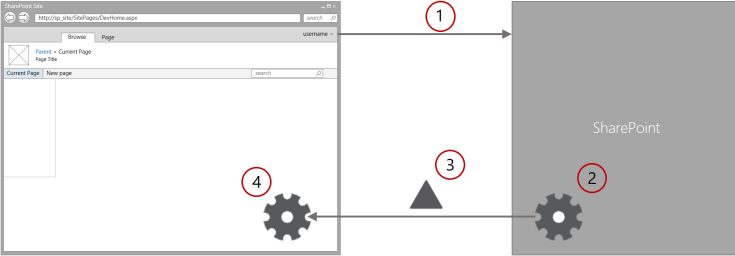
You might seen the page URL in sharepoint 2013 looks like below. http://sp201323:8085/sites/TeamSite/_layouts/15/start.aspx #SitePages/Home.aspx In the above URL, you are looking for home.aspx to load.But the URL targets start.aspx .Do you know what is the reason behind this? This is nothing but Minimal Download Strategy Feature. Minimal Download Strategy (MDS) is a new technology in SharePoint 2013 that reduces the amount of data that the browser has to download when users navigate from one page to another in a SharePoint site. Benefits of using MDS Using MDS provides several benefits, including: Speed:   Smooth transitions: Browser navigation controls:   Other AJAX-based systems confuse the   previous   and   next   buttons in browsers. Because MDS updates the URL in the browser window, the previous and next buttons work just as they are supposed to. Backward compatibility:   The MDS engine either provides M...

Sharepoint 2013 Task List Different Views in in custom page layout.

Use the below snippet to show different sharepoint 2013 task list views using custom page layout. All Tasks  <View List="Lists/TaskListName" BaseViewID="1" WebPartZoneID="MainTopZone" WebPartOrder="1">         <![CDATA[           <webParts>               <webPart xmlns="http://schemas.microsoft.com/WebPart/v3">                   <metaData>                       <type name="Microsoft.SharePoint.WebPartPages.XsltListViewWebPart,Microsoft.SharePoint, Version=14.0.0.0,Culture=neutral,PublicKeyToken=71e9bce111e9429c" />                       <importErrorMessage>Cannot import this Web Part.</importErrorMessage>                   </metaData>   ...

Sharepoint 2013 Script Editor web part CData for custom page layout using visual studio.

In order to include a javascript into a custom page layout,we can use script editor web part. Below snippet used to add a Script Editor web part to a layout.This script editor web part specific for Sharepoint 2013.But in the case of a Sharepoint 2010, we don't have a script editor web part.So we can use content editor web part in order to include a javascript to a page or layout. <AllUsersWebPart WebPartZoneID="MainTopZone" WebPartOrder="1">         <![CDATA[       <webParts> <webPart xmlns="http://schemas.microsoft.com/WebPart/v3"> <metaData> <type name= "Microsoft.SharePoint.WebPartPages.ScriptEditorWebPart, Microsoft.SharePoint, Version=15.0.0.0, Culture=neutral, PublicKeyToken=71e9bce111e9429c" /> <importErrorMessage>$Resources:core,ImportErrorMessage;</importErrorMessage> </metaData> <data> <properties> <property name="Title" ty...

Sharepoint : Query multiple list from multiple site in a site collection.

  SPSiteDataQuery class Use SPSiteDataQuery class to fetch data across multiple list in multiple sub sites within a site collection.Below snippet shows about how do we use it.This class makes you a smart developer instead of looping all the sub sites. You can use an instance of this class to retrieve data from selected lists or from all lists in the current site collection. Specify the scope of the query by setting the  Webs property. Specify the lists to participate in the query by setting the  Lists  property and the fields to return by setting the  ViewFields  property. Control data selection and order by setting the  Query  property. SPWeb web = SPContext.Current.Web; SPSiteDataQuery query = new SPSiteDataQuery(); //Ask for all lists created from the contacts template. query.Lists = "<Lists ServerTemplate=\"105\" />" ; // Get the Title (Last Name) and FirstName fields. quer...

Save a publishing site collection as template in SharePoint 2013.

In SharePoint 2013, save as a template for publishing site is not available.While accessing directly it may prompt for Access Denied. In order to enable use the following power shell script. # Get a reference to the target site $web = Get-SPWeb http://Intranet.sites.com/Publishing # Update the property bage value and set it  to the string value "true" $web.AllProperties["SaveSiteAsTemplateEnabled"] = "true" # Commit the property change to server $web.Update()   Now you can access the save site as template through   http://sitename/_layouts/savetmpl.aspx  directly.

Upgrade a List definition WSP and install the feature.

In order to avoid the data loss from an existing list, while creating a new list definition in the same solution,Follow the below steps.... 1.Create a new list definition in a existing list definition solution. 2.Create a new feature (ex:" New_List_Feature "). 3.Include the newly created list definition to a newly created feature. 4.Build and Publish the list definition WSP from a solution. 5.Upgrade a WSP using the following power shell script. ( Update-SPSolution -Identity wspname -LiteralPath Physicalpath -GACDeployment ) Update-SPSolution -Identity ListDefinition.wsp -LiteralPath C:\Users\username\Desktop\ListDefinition.wsp -GACDeployment  6.Install the newly created Feature using powershell script. (Install-SPFeature FeatureFolderName) Install-SPFeature "ListDefinition_New_List_Feature" where folder name available in the C:\Program Files\Common Files\microsoft shared\Web Server Extensions\15\TEMPLATE\FEATURES