Posts

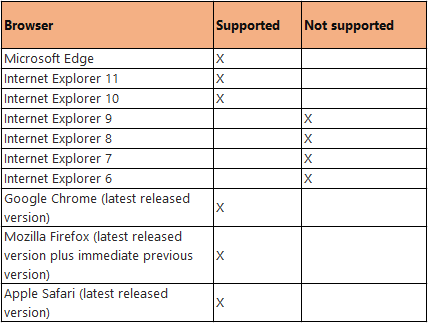
SharePoint 2016 Release Candidate- Browser support levels

Image

Next release of the SharePoint Designer and Infopath

There is no more release on the SharePoint Designer and Infopath. But Microsoft still support 2013 version till the lifetime of SharePoint 2016 (till 2026). "InfoPath 2013 and SharePoint Designer 2013 will be the last versions of those products. SharePoint Designer is not being re-released with SharePoint Server 2016, although we will continue to support custom workflows built with SharePoint Designer and hosted on SharePoint Server 2016 and Office 365. Support for InfoPath 2013 and SharePoint Designer 2013 will match the support lifecycle for SharePoint Server 2016, running until 2026."  For more info visit FAQ in below URL https://blogs.office.com/2016/01/20/sharepoint-server-2016-and-project-server-2016-release-candidate-available/

Bulk update and delete using SPservice in SharePoint

$().SPServices.SPUpdateMultipleListItems({ listName: "States" , CAMLQuery: "<Query><Where><Eq><FieldRef Name='Status'/><Value Type='Text'>Active</Value></Eq></Where></Query>" , valuepairs: [["Status", "Inactive"]] }); This call to SPUpdateMultipleListItems will update all of the items in the States list which have their Status = "Active", setting their Status = "Inactive". $().SPServices.SPUpdateMultipleListItems({ listName: "States" , CAMLQuery: "<Query><Where><Eq><FieldRef Name='Status'/><Value Type='Text'>Inactive</Value></Eq></Where></Query>" , batchCmd: "Delete" }); This call to SPUpdateMultipleListItems will delete all of the items in the States list which have their Status = "Inactive".

Delete the document using SPServices

function deleteFile ( itemID , fileRef , listName ) { // This is the command needed to delete the specified file. It uses the ID and the URL of the file name. These values must be passed into this function when calling it. var batchCmd = "<Batch OnError='Continue'><Method ID='1' Cmd='Delete'><Field Name='ID'>" + itemID + "</Field><Field Name='FileRef'>" + fileRef + "</Field></Method></Batch>" ; // Use SPServices to delete the file. $ (). SPServices ({ operation : "UpdateListItems" , async : false , listName : listName , updates : batchCmd , completefunc : function ( xData , Status ) { // Check the error codes for the web service call. $ ( xData . responseXML ). SPFilterNode ( 'ErrorCode' ). each ( function (){ responseError = $ ( this ). text (); // If the error codes indicate...
Remove left navigation and chrome controls from Newform, editform and viewform of a Sharepoint List

Image
When you send a query-string IsDlg=1 for list OOTB list forms, then what happen? See below....                                                        Without query-string IsDlg=1 With query-string IsDlg=1

Workaround for upload Image from computer in description field of a list in SharePoint APP

Problem: In the development of SharePoint 2013 APP, we found an issue with upload a image from computer to a description field of a list in the app. Causes:  Whenever we are uploading a image to SharePoint list or page, the image actually stored in an asset library.But in the case of SharePoint app we don't find any such kind of library to store these files.Because of this reason, app wont find any place to store the image file then it will throw an error.​ Work Around : In order to resolve the above issue, we need to include a document library in the SharePoint APP.

Custom News feed web part for SharePoint site feed app.

Use the below code to populate and post the feed in site feed app in SharePoint 2013. Note : Enable/Activate Site feed feature in the list of available features var clientContext; var feedManager; var allfeeds; var website; var websiteurl = ""; function populatePosts() {     try {         SP.SOD.executeFunc('sp.js', 'SP.ClientContext', sharePointReady);     }     catch (ex) {         alert(ex);     } } function sharePointReady() {     clientContext = SP.ClientContext.get_current();     website = clientContext.get_web();     clientContext.load(website);     clientContext.executeQueryAsync(onRequestSucceeded, onRequestFailed); } function onRequestSucceeded() {     // Ensure that the SP.UserProfiles.js file is loaded before the custom code runs.     websiteurl = website.get_url();     SP.SOD.executeOrDelayUntilScr...