Posts

Image
  How software helped world during the pandemic The COVID-19 pandemic has changed the way we work, study and socialize. In particular, it has accelerated the trend towards digitalization. Many organizations have had to adopt new technologies to stay afloat during these difficult times. Here, we take a look at how different software applications have helped people and businesses during the pandemic. How did software help during the pandemic? Software has helped the world in a number of ways during the pandemic. Perhaps most importantly, it has allowed people to stay connected when they otherwise would have been isolated. It has also been a valuable tool for research and data collection, helping to inform decision-makers about the best course of action to take. In addition, software has played a role in the development and distribution of vaccines and treatments. And it will continue to be an important part of the response to the pandemic, helping us to track the spread of the di...
SharePoint Spaces- Enable mixed reality feature in SharePoint

Image
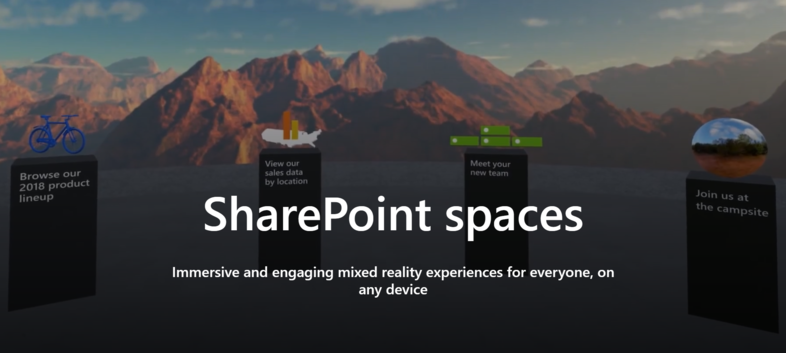
Which pivotal feature gonna to make the major changes in the upcoming web technology? The answer is Mixed Reality, which will be the near future evolution in human, computer, and environment interaction in the technology world, and it is obvious that this revolution is going unlocks possibilities which cannot be imagine by  common users  at present. Mixed Reality feature will ensure that the SharePoint is reaching another milestone in the Web of Things (Web 4.0).Okay lets come to the point, Is really SharePoint providing Mixed Reality as a OOTB feature at present? yes, SharePoint released Mixed Reality as a OOTB feature called Spaces.  This feature is available as a preview in Modern sites. As  Microsoft suggested, communication site will be more suitable than team site. Since communication site has more screen space to work with, at the same time this feature is also possible with Team site. It is very easy to bring the feature into your site...

Customize Theme in SharePoint Online Portal

Image
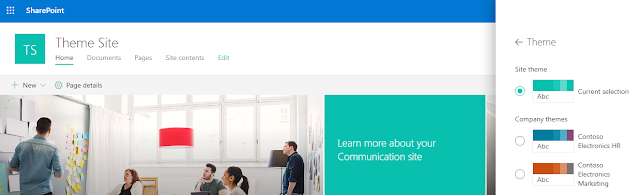
Organizations can have a uniqueness to the sites in the intranet portal while each department or branch has a separate site. Most people wouldn’t like to change the colors completely in the theme as available in OOTB, instead, they would like to change few things on the page while it still looks like their original theme of the organization. Microsoft has brought in an option to implement the custom theme in SharePoint online. So this post talks about how can implement the theme customization in SharePoint Portal. Microsoft has provided an online generator to create a custom theme which helps site owners to select the color combination and verify instantly. Below screen shows how the generator looks like. https://aka.ms/themedesigner Instantly showing the changes in sample page which is available right after the color slider. After finalizing colors, you can export it in different ways as JS code, JSON and PowerShell Script. This article is going to explain the way yo...

Configure SharePoint 2016 on-premises to deploy the SPFx web part

Image
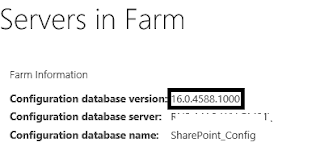
Follow the steps to configure SharePoint 2016 on-premises to deploy the SPFx web part 1. SharePoint 2016 requires Feature Pack 2 to deploy SPFx package. So Feature pack 2 is available in SharePoint 2017 CU update as mentioned in below URL. https://blog.stefan-gossner.com/2017/09/12/feature-pack-2-for-sharepoint-server-2016-aka-september-2017-cu-is-available-for-download/                                   1. Download and install both language independent and dependent packs available in the below URL.                                                 DownloadSeptember 2017 Update for...

SharePoint 2016 toolchain for developing the custom application

Image
SharePoint modern toolchain for developing the custom application for both online and on premises. For more details:  https://www.youtube.com/watch?v=T_bGyqKwT4g https://blogs.office.com/2016/05/04/the-sharepoint-framework-an-open-and-connected-platform/

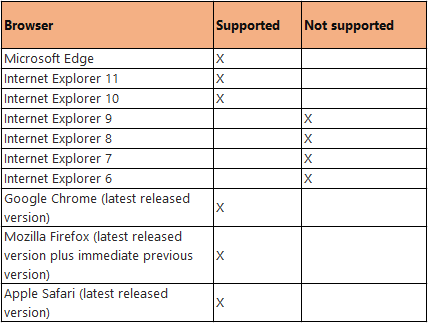
SharePoint 2016 Release Candidate- Browser support levels

Image

Next release of the SharePoint Designer and Infopath

There is no more release on the SharePoint Designer and Infopath. But Microsoft still support 2013 version till the lifetime of SharePoint 2016 (till 2026). "InfoPath 2013 and SharePoint Designer 2013 will be the last versions of those products. SharePoint Designer is not being re-released with SharePoint Server 2016, although we will continue to support custom workflows built with SharePoint Designer and hosted on SharePoint Server 2016 and Office 365. Support for InfoPath 2013 and SharePoint Designer 2013 will match the support lifecycle for SharePoint Server 2016, running until 2026."  For more info visit FAQ in below URL https://blogs.office.com/2016/01/20/sharepoint-server-2016-and-project-server-2016-release-candidate-available/